Most of you have probably heard of the book Getting Things Done: The Art of Stress-Free Productivity by David Allen. GTD, as it’s become known, is the latest, greatest way to be more productive in less time.
I’ve personally read the book, and used its techniques to great effect while producing TV shows like Beauty and the Geek and Scream Queens.
Actually Getting Things Done
While you can implement David’s system using only pen and paper, I’m a geek. I live on my computer and iPhone. They form my “trusted system”–the place I know all my ToDo’s live.
There’s plenty of desktop software out there to help you “Get Things Done.”
I’ve tried them all. Every single one. If it exists, I’ve tested it out. There’s only one I love: a program called The Hit List.
One Huge Problem: No iPhone App
Yes, shoot me now. Some of the other apps out there have corresponding iPhone software. The Hit List, not yet. I was contemplating leaving The Hit List for one of the other GTD apps on the market, when, today, something magical happened…
2Do from Guided Ways was Released
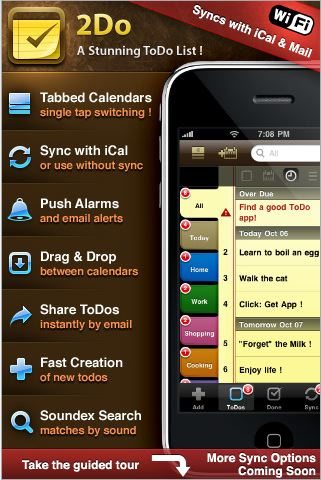
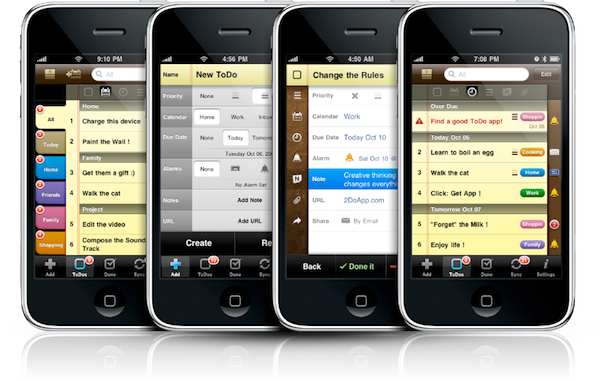
It’s amazing. Having tried 5 or 6 other to-do apps on the iPhone, this one blows them all away.
Gorgeous user interface, terrific animations, easy to navigate…all the features I’ve always wanted.
Using the app, it feels like the good people at Guided Ways asked themselves,
- What will make the user happy?
- What will make the app easy to work with?
- What will make it FUN to use?
Then, they went and built that app.
2Do has the Best iPhone to iCal Sync of Any Stand-Alone iPhone App. Period.
I know this, because I’ve been frustrated with all the rest of them.
Because it syncs with iCal (or the software we use, BusyCal) via a free download called Mac Sync Helper, this stand-alone iPhone app becomes infinitely useful.
In our case, since The Hit List can sync with iCal, and iCal syncs with 2Do, I now have a GTD system that works on both my laptop and my iPhone. Hooray!
Video Demo Coming Soon

I’m putting together a little video post demonstrating the workflow. Be sure to follow us on twitter or to subscribe to our feed so you don’t miss it.
In the mean time, if you want to take a peak at 2Do, this link will take you there (Note: launches iTunes.)
Get Things Done with 2Do
We start shooting season 2 of VH1’s Scream Queens in about 5 weeks. To keep me sane, I started using 2Do, today.
Update As per the question in the comment section below, this was in no way a “paid advertisement.” We do occasionally link to a product we’re over-the-moon about, but not for the extra 47 cents we may make here or there. The small cash generated from our links will eventually go toward product give-aways or other blog-expanding costs. Sorry for any confusion. We purchased 2DO and use it everyday.


Having had a Blackberry, I don’t miss it. But, there are great GTD apps for your platform, too, so don’t feel too bad. Unless you want an excuse to get an iPhone. Then I say: YOU NEED AN IPHONE
Just wait until it comes to Verizon. Should be soon.
Yeah, I seriously doubt that. http://www.engadget.com/2009/10/17/verizons-anti-iphone-gets-its-first-commercial-droid-does/
I say that as I can get my tasks from THL to 2Do via iCal, and it gives me a way to carry the days important tasks with me, but syncing back to THL is not reliable. Changes don’t ‘always’ sync back, adding a new item will not go back to THL, though it does to iCal, unless I don’t set alarms etc. and leave it in my ‘Inbox Calendar’. This is not ideal.
I’ve been here before with Appgio’s ToDo, and suffered data loss with it. I’m not sure where the problem lies, whether it is on the iPhone end, iCal, or THL itself.
The sad thing is that out of all the major GTD apps I like the THL desktop best of all, but the lack of a reliable iPhone sync is going to kill it for me. I’ll either return to Things, or use a convoluted hybrid of THL and Things until the iPhone app is available. I’ve already moved my work tasks out of my home desktop, they are all in Toodledo as I have no need, or desire, to be completing them from my home desktop, and keeping them out of iCal was an advantage.
It has been getting to the point where finding and testing a usable GTD app has been taking more time than doing the tasks themselves!
You should contact THL and ask them how they’re syning with iCal. If 2Do’s changes aren’t making their way from iCal to THL, they need to look into this. Our job ends when 2Do is able to sync back to iCal.
Thanks for your question. I have to admit, iCal drove my BONKERS, which is why we switched to BusyCal. I think there’s a free trial. It’s billed as iCal on steroids, and was built to make this type of syncing flawless. So far, it has blown iCal out of the water on every level.
Here’s how the 2do/THL/BusyCal combo works for me (not perfect, but so much better, I’m ecstatic…)
1. In THL, every task has a context, and a project.
2. In BusyCal I only make calendars for my
contexts.
3. My iPhone, using 2Do, syncs with all the context calendars, and
imports the tasks with the name of the project in front of it.
4. When adding tasks to my iPhone, I only give them a context, no
project. This dumps them in my THL Inbox with the correct context
still intact. Then I just put it in the appropriate project (list) in
THL.
This essentially makes my iPhone my “context” center. The only thing
I wish 2Do could do is list tasks alphabetically, since then all the
projects could be listed together (you can sort by calendar, note,
priority, and a few other criteria, but not alphabetically.) But at
the end of the day, @calls is @calls…I gotta make the calls no
matter the project they are in. On my phone, the context is more
important to me than the project.
So far, it’s working AWESOME. Putting together a video demonstration
later in the week on the blog.
Holy Cow! That ad is crazy! Is Verizon really launching all our war on the iPhone?
When did this happen? Been waiting to get a video iPhone until it was avail at Verizon. Might need to change that strategy!
I felt like Simon, who said – “It has been getting to the point where finding and testing a usable GTD app has been taking more time than doing the tasks themselves!”
Tried Things, Omnifocus, Midnight In-Box. My favorite was iGTD which is now defunct. Then I found THL and have been ecstatic…except for the lack of good iPhone syncing. Wasn’t happy with Appigo sync (thought kudos to them for trying) but 2Do is going to get me through production of Scream Queens, which is great.
I should say, OmniFocus is the “official” GTD app, ordained by David Allen himself. But I didn’t like it. It was no fun to use. It’s really expensive. I never wanted to open it up. On the other hand, The Hit List has been a blast.
At least I’m giving it a go with 2Do on the iPhone (that I mini-reviewed as well) with The Hit List and it is working well. The only tedious part of the workflow: THL syncs Apple ToDo and iCal and then 2Do syncs separately. I hope Apple allows more integration with Mail and iCal so it’s easier for devs to produce apps that compliment each other and actually help you getting things done!
I know how you feel. We tried so many work arounds in hopes of an OTA (over the air) automatic update. Seemed like no matter what we tried, there were issues, and things eventually fell out of sync, or just exploded! This THL/2Do combo has been great. Additionally, we feel like adding BusyCal has made us completely stable. Where we used to use MobileMe, we’ve now created a Google Calendar for the company, and keep BusyCal in sync with that. It’s been SO much more reliable and stable than MobileMe ever was.
Thanks for your comment!
Based on your comment above regarding contexts and alphabetic sort, v1.1 is coming out with a number of improvements (allowing you to focus on specified tasks, customize badges, manual and alphabetic sort etc). More interesting is how it will recognize @ labels in To Do titles. If Title Sort is preferred for a specific calendar, it will automatically ‘group’ related contexts under a single index. So all your ‘@call blah’ would list under @call
Moreover you will be able to attach contacts/actions (call, sms, visit, location etc) to To Dos.
Hopefully future updates will bring more improvements. Many thanks!
If there would be a way to strip out the *** LISTNAME + @context + /tag *** addition that THL puts into the task line (or put it at the end of the line), I’d even be able to READ my tasks on 2Do without having to open the todo.
Next to that I really a digging 2Do, it’s really FUN to use.
However, your post reads more like an ad than a review, and your links to the 2Do apps seem to be paid affiliate links, but you don’t disclose that in your text. So for me, this post ends up feeling more like a paid advertisement for the app than an independent review.
I’m not accusing you of anything, and you may in fact just be an enthusiastic user hoping to get a tiny kickback if people buy the after reading your post. But when I see affiliate links, and the author doesn’t say something like: “note: I get a referral fee when you purchase the app through this link” it makes it hard for me to trust the review as unbiased.
So I’m wondering if you’d be willing to clarify this?
Absolutely! Thank you for asking. This is in no way a paid advertisement. In fact, I, like you, got The Hit List from MacHeist last year, and did the same song and dance with Things versus THL. As for the kickback, we have experimented with several text links here in no way to “get rich” (we make our money as producers, after all) but thought it might generate enough revenue to one day offer some sort of give-aways or some such thing. I believe in the entire course of blogging we’ve made somewhere in the neighborhood of $7 (don’t quote me).
Being a part-time blogger and a full-time producer, I admit some things never occurred to me, such as your question above. I’m now clarifying it in the post, and will do so wherever we have an Amazon link or some such thing. In fact, thanks to your question, I’ve created this page on affiliate links at our blog, and also added it to the “Must Read” posts section in the right hand column. I hope this addresses your concern.
For the record, however, I was simply over the moon about 2Do and wrote about it the day it came out. I purchased it, and use it every single day. I will do so until THL finally releases their iPhone app…if it’s as good as 2DO.
Thanks Andy!
Best,
Biagio
of your response. I’m still figuring out how I want to do GTD but I’ll def. consider this for the iPhone side of things.
To get 2Do to sync with BusyCal, I just press a button.
But to get The Hit List to sync with BusyCal… well I can’t find a button.
Is there anyway to do this?
You’re going to want to first set up calendars you want THL to sycn with (For instance, I have @Computer, @Errands, @Home, @Office, etc.) Once those are set in either busy cal or ical (sounds like you’re in BusyCal) go to THL, and from the menu choose THE HIT LIST—>Preferences. Choose iCal sync, check the button that says “Sync with the system calendar” then select the calendars you want to sync. With the calendar selected, you’ll see the “Sync with tags” become available. For instance, my calendar @Computer syncs with any task I tag @Computer. Try it, it’s not as complicated as it sounds. Best part–no button pushing necessary…anything you update in one is instantly updated in the other. It’s automatically in sync.
Like you, I stumbled on the 2Do and THL combo by accident. The two seem like such an ideal combination – not just from a functionality point of view but also design (I’m a designer so that matters to me). I tried Things but was quickly disappointed with the lack of nesting and the utterly boring/uninspired interface design.
The one problem I’ve been having with the 2Do/THL/iCal combo is the duplicates issue. The first sync works fine but subsequent syncs see the 2Do items acquired from the previous THL sync as new items and duplicates them. The duplicates appear in both iCal and the THL In Box. So far, I’ve managed by simply deleting the duplicates after syncs but it’s a pain.
If I’m understanding your post, however, you’re saying this is not a problem at all with BusyCal?
Also, I’m trying to understand if the use of @-context tags rather than /-tags is a personal preference for you or a necessity for BusyCal to sync correctly? I prefer /-tags to selectively choose the items from a larger @-context project that I want to include on my iPhone.
Thanks!
BTW, I left a message in the 2Do “suggestions” forum requesting that they consider a collaboration with Andy Kim at THL! Seems like it could be a win-win marriage for all.