How to Write a Screenplay on the iPad

screenwriting-iPad-02.png

Yes, We’re Geeking Out

Sure, Final Draft has announced that there will be some kind of iPad version of their screenwriting software, and Black Manna has a screenplay program that runs on the iPhone (which theoretically should work on the iPad in a zoomed in “iPhone” manner, but the company says they’ll be releasing an official iPad version soon.)

In the mean time, if you have your shiny new iPad, and want to write a screenplay in full on iPad mode…what to do?

Get Pages for iPad and Try Our Template

If you have an iPad, chances are you’re going to buy Apple’s iWork app Pages sooner or later. At $9.99 it’s not a break-the-bank piece of software, and it’s sort of a must-have for iPad owners, anyway.

The full, desktop-version of Pages ’09 has a screenplay template, but…alas…that template is missing from the iPad version. Besides, that template’s not very good…the margins are wrong, and it doesn’t work the way I’d like it to.

So We Experimented

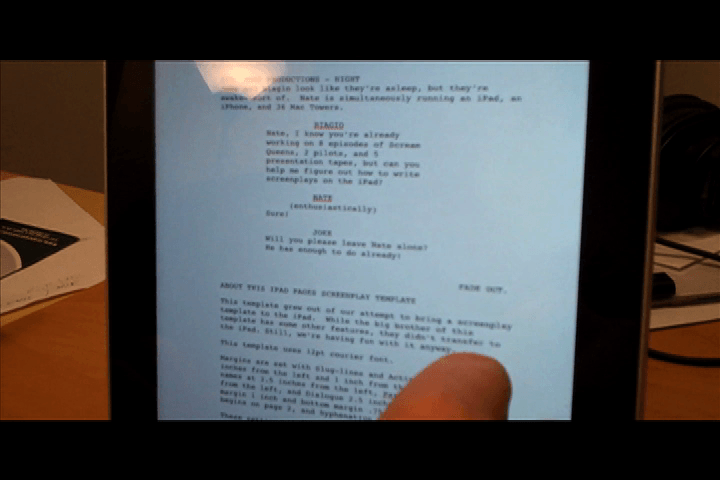
Since I’m used to not sleeping these days, I stayed up last night and built a new screenplay template for Pages 09. We then took that template, added some hot keys, saved out a Pages doc, emailed it to Nate’s iPad…and voila! It worked!

Well almost…a few things didn’t come over. The style names look weird (they were chopped to the first two letters for some reason) and a there’s no F-Key support on the iPad, so you can’t use hot-keys to choose style elements. Still, you now have a way (albeit hacky) to write screenplays on your iPad.

Perfect?

Heck no, but we’re still geeking out. I mean, what fun is a new gadget if you don’t try crap with it? To write screenplays on your iPad, here’s what you do:

  • 1. Download our iPad Pages ’09 Joke and Biagio Screenplay Template.
  • 2. Email it to your iPad.
  • 3. Open the file and get writing.
  • Of course, if you don’t have an iPad, but would love to use a screenplay template in Apple’s Pages ’09, this template for the desktop version of Pages ’09 will do the trick.

    It has a few more bells and whistles than the iPad version, with instructions on how to use it as well. I may post a video on this somewhere down the line if there’s interest.

    So what do you think…just a bunch of geek nonsense? Is it cool? Am I working Nate to hard? Chime in!

    UPDATE: Because a few of you have asked, here is a link to the wireless keyboard Nate’s using in the video: Apple Wireless Keyboard (Retail Packaging)

    Speaking of Nate, here’s the video of us being way too geeky for our own good, demonstrating how to write a screenplay on the iPad:
    UPDATE: Apple has fixed Pages so you can now get the menu in landscape mode, making this template much more fun to use. Thanks, Apple!

Ready to Break into Hollywood?

  • • Learn to turn your ideas into films and TV shows
  • • Discover secrets to get noticed by Hollywood
  • • Pitch us your reality TV and documentary series ideas.
  • • Seriously.

          Sign up and we might work together soon. 

  • Nicofopolous

    Wow. Thank you for doing the legwork on this. I kinda wish I’d held off on buying my new MacBook Pro now… Thankfully, it’s still pretty.

  • http://twitter.com/tenindenmark Tamela Ehlinger Nielsen

    I LOVED this! While I am not a writer/producer etc – I really enjoyed watching the demonstration you gave. The fact that you made your own PAGE since the one on the iPad did not function well, tells me you two are really “geeking out”. I love geeks, I am a non-pro geek, but geeky enough for new gadgets and software.

    Thanks for sharing this. Love all that you do.

    Take care
    Tamela

  • http://kingisafink.com Jessica King

    You guys are great. I

  • http://kingisafink.com Jessica

    Oops, the above comment got cut off. Anyway, I’m enjoying your exploration of the iPad. I can’t wait to see what you do next.

  • http://www.michaeltapp.com Michael Tapp

    It would be hilarious if you guys wrote a short film on the iPad about iPads. But unfortunately, you couldn’t shoot the film on an iPad. :-)

  • http://www.jokeandbiagio.com Biagio

    Nicofopolous: Don’t feel too bad. As you can see, it’s still kind of hacky, but being a geek, I”m having major fun with it. I do think that as Pages matures, or when FD releases their iPad version (though who knows how expensive it will be) that it be a fairly viable way to write screenplays. MacBook Pros rock!

    Tamela: Thanks so much for your kind comment. Yes, we probably geeked out more than we should :-)

    Jessica: Thank you! You two are also great and have been very supportive of the blog. Thanks for always stopping by.

    Michael: Funny! If only i thad a camera, right? BTW, now that we’re finally back we’re going to put up that Ira Glass interview you told us about.

  • http://www.michaeltapp.com Michael Tapp

    Well, some iPhones have cameras. :-)

    I’m really thrilled to hear that you guys are going to write a post about the Ira Glass video. I’m glad that some more content creators will find it because of your site. The video honestly changed my outlook on developing your own voice.

  • Erik

    Nice! Thanks for this, guys. Been using my iPhone Screenplay app and this will make things so much easier until FD releases something. I truly appreciate it.

  • http://www.jokeandbiagio.com Biagio

    Erik,

    Great! Please let us know if it’s useful for you. We built it and tested it, but it’s not “battle tested.” Of course, we’re working with the limitations of the iPad, so there’s not a whole lot more we can do right now (that we know of) but would love to hear your experience. It may stimulate some other solutions from us or the community.

  • http://www.aegisstudios.com travis Legge

    Again, we see the awesomeness of the iPad displayed, courtesy Nate Orloff, or as I like to call him : MODOK

    Inside jokes aside, it really looks like you’re exploring the iPad in a thorough manner, thinking sideways to find solutions, and being unafraid to point out shortcomings where you find them. Incredibly useful information for those of us who are considering (on in my case drooling over) the possibility of getting an iPad as a media production tool.

    Kudos and thanks for again dropping knowledge.

  • Pingback: How to Write a Screenplay on the iPad | Hot Buzz

  • Super Nick

    That’s great that Filmmakermagazine.com picked this up. It’s good to see work recognized… you know, beyond me…

  • http://www.jokeandbiagio.com Biagio

    Is there such a thing as higher praise than that coming from Super Nick? Hard to say, but doubtful!

  • Ezra

    Thanks guys! Just found your site while looking for someone, anyone who has already come out with a screenwriting app for the iPad. Until a (good) dedicated app is developed, I think your template will fill the void. It’ll be great if you keep tweaking it. Maybe develop your own app for the app store? I’m sure Final Draft for the iPad will be good, but expensive. A simple way to sketch out a scene or sequence, light editing when inspiration hits is all I’m looking for. Thanks again for working on this and sharing your efforts to the world!

    • http://www.jokeandbiagio.com Biagio

      Ezra,

      Thanks for your kind words. We have ideas for some iPad, iPhone, and Mac apps…but, as you can imaging, producing is a full-time gig. So we’re going to do our best to pitch in where we can, and spotlight the great work of other developers the minute we hear about it.

      Thanks so much for stopping by!

  • http://mike-halleen.com Mike Halleen

    Interesting. I still think I’ll prefer my Windows Netbook for writing. As soon as you prop up the iPad and attach an external keyboard, why not just move to a laptop?

    But I love the pad for reading and am starting to play with iAnnotate for marking up scripts and manuscripts. The pad is a great “lean back” device for reading, but I’ll stick with a regular computer for leaning forward and writing.

    • http://www.jokeandbiagio.com Biagio

      Mike,

      I think most people will do well writing on their laptops and desktops. Part of the experiment for us was to see if people like Nate, students/early 20s, who decide to go for an iPad over a laptop, could potentially use it to write a screenplay. Myself, I love my Macbook pro, and pretty much live on it.

      Question: How has the iPad been on your eyes for longer reading sessions? Would love to know.

      Thanks for stopping by!

  • http://bulletproofyourjob.com Stephen Viscusi

    This is a great idea!
    Stephen
    Twitter: WorkplaceGuru

  • Pingback: Found Footage: How to write a screenplay on the iPad « Apple News Daily

  • Pingback: Found Footage: How to write a screenplay on the iPad | oQlz Blog

  • Pingback: Found Footage: How to write a screenplay on the iPad | Tech News Ninja

  • Pingback: Found Footage: How to write a screenplay on the iPad

  • Pingback: Found Footage: How to write a screenplay on the iPad | Apple latest news

  • Pingback: Found Footage: How to write a screenplay on the iPad | Design City

  • Pingback: Found Footage: How to write a screenplay on the iPad | Marthee's Tech News

  • Pingback: Found Footage: How to write a screenplay on the iPad « Apple « Apple News Fan Page

  • Pingback: iPhone Home » Blog Archive » Found Footage: How to write a screenplay on the iPad

  • Pingback: » Found Footage: How to write a screenplay on the iPad

  • Stuart Benedict

    What are you using as a stand for the iPad?

  • Pingback: Found Footage: How to write a screenplay on the iPad | Forum on Cameras

  • Pingback: Found Footage: How to write a screenplay on the iPad | Free iPad - One Time Offer!

  • Pingback: iPad Screenplay Love: Thank You

  • Pingback: Found Footage: How to write a screenplay on the iPad : iBrowzz

  • Pingback: Found Footage: How to write a screenplay on the iPad | Mobile Press

  • Pingback: Found Footage: How to write a screenplay on the iPad | Free Ipad Me! The Best Source for Ipads!

  • Pingback: Found Footage: How to write a screenplay on the iPad · computer hardware prices

  • Pingback: Found Footage: How to write a screenplay on the iPad «

  • Pingback: Found Footage: How to write a screenplay on the iPad | ipad Planet

  • Pingback: Found Footage: How to write a screenplay on the iPad - A Collection of Latest Happening in Technology Field

  • http://www.aegisstudios.com Travis Legge

    Hey all,
    Just a quick note: I just downloaded the pages template directly onto my iPad. Seems to work just fine. As long as you have Pages on the iPad it will open it right up from safari and you can copy the doc, delete the exsisting text in the template copy and you are good to go!

    I look forward to testing this template out!

    Thanks,
    Travis

  • Pingback: Found Footage: How to write a screenplay on the iPad | iPod/iPhone Forum

  • http://mike-halleen.com Mike Halleen

    Biagio, I’m fine reading on in. (I’ve posted longer review on my blog, just click on my name)

    I do have two sets of glasses, one for far distances which I wear all the time, and one for close range that I rarely use. I found it difficult to read using my distance specs so I pulled out the reading set and now it’s very comfortable.

    I have the same issue with my pc screen, so I don’t blame the pad. I have not tried a Kindle or Nook extensively to see how it compares.

  • dlw

    It’s not the intuitive ease of the Final Draft I’ve gotten so used to (strung out on) over the last 15 years, but it’s better than nothing. Has anyone figured out how to drop something written on the Pages template into a FD document and hold the margins/elements?

    I honestly couldn’t care less how much a FD iPad app costs as long as it allows me to work on the fly with the little tablet. As for why I don’t just use a windows netbook, my answer is based more on taste and comfort than logic. I found it challenging to migrate off the PC/Dos/Windows platform years ago and just don’t want to deal with the hassle of going back. I like the Mac aesthetic and the ease of synching with my desktop and laptop. However, I’m tired of lugging around the old Powerbook and if a FD/iPad combo gives me function and super-lightweight portability, along with 10 hours of battery life, email, websurfing, vid, music and photo consumption, what’s’ not to like?

  • Erik

    DLW,

    Export/email it to yourself as a .DOC file, open in Word, save as a .RTF then open in Final Draft.

    I do it all the time, works great!

  • dlw

    Erik-

    Thanks! That worked a charm. I’m going on a trip – with a script due in 2 weeks – and want to use it as a test for an iPad-only journey. Though I continue to salivate over the FD iPad release, this seems like it will do just fine in the short term.

  • Kimo

    You guys rock! I just downloaded the template straight to my Pad and it works fine. Thank you so much. Hope to see you some day in Hollywood.

  • Pingback: New Screenplay Template for iWork: Free.

  • Pingback: How to Make the Move to Hollywood

  • F. Lagnab

    I expected the iPad’s keyboard to be a pain, but I was surprised … it’s *easier* to type on than a physical keyboard. Consequently, I do way more writing on the iPad than on my desktop PC, which means I’m writing in more idyllic places than ever — e.g., my back patio, the park, etc. There’s no way, after 6 weeks with this device, that I’d ever go back to a laptop, even a MacBook.

    And a netbook –? Pshaw! That teensy screen? Those awful keys? That anemic CPU? That antediluvian OS?? I’d rather get scrofula.

    Just to stay on topic: your Pages template is also pretty keen.

  • http://www.jokeandbiagio.com Biagio

    @ F. — Thanks. Glad the template has proved helpful. It’s good to hear that it’s working for you in the “real world” beyond all the testing and hypothesizing.

  • Pingback: Smart Phones Advancing FILM? | Connect. Create. Conquer.

  • Pingback: Cut Notes for Final Cut Pro Rocks Post Production | Joke and Biagio