New Screenplay Template for iWork: Free.

There are some great screenwriting programs out there, both free and paid. Final Draft is known to be the Hollywood standard for paid apps, and the do-it-all-in-one-app-for-free phenom Celtx is a must try. It’s free, after all, and it works like a real screenwriting program (if not feeling the most “Mac” like.)

Here’s another option you might like to try, that turned out a little better than I expected.

You may have heard about the geeky shenanigans my lead assistant editor and myself have been up to, figuring out ways to use the iPad for film and TV production. On of those experiments was finding a way to write screenplays on the iPad.

Well, here’s one for those of us who aren’t as cool as Nate and still write on our regular old macs.

I Made a Template in Pages ’09

While there were a few Pages screenplay templates out there (including one that comes with the program) they weren’t quite right for me for one reason or another. So I built this little template, and I like it more than I thought I would.

No Bells and Whistles

It’s just a template, so it doesn’t do all the things you’d wish a screenplay program would do. No automatic MORE’s and CONT’Ds, no just pressing the TAB bar to automatically change the screenplay elements. However, I was able to build in some rules that make some things automatic.

About this Template

This template uses 12pt courier font.

Margins are set with Slug-lines and Action blocks 1.5 inches from the left and 1 inch from the right, Character names at 3.5 inches from the left, Parentheticals 3 inches from the left, and Dialogue 2.5 inches from the left. Top margin 1 inch and bottom margin .75 inches. Page numbering begins on page 2, and hyphenation is turned off.

These settings are pretty standard depending on which book/website you go by, and seem to line up well with professional screenwriting software.

How it Works

Unlike a dedicated screenplay program, there are no automated MOREs or CONT’Ds. Also, using the TAB key won’t change from one type of screenplay element to another, so I built you a couple ways to move between elements.

Using F-Keys:

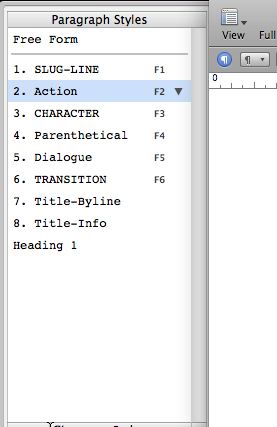
F1=Slug-line, F2=Action, F3=Character,
F4= Parenthetical, F5=Dialogue, and F6=Transition.
Paragraphe_Styles_Joke-And-Biagio-Screenplay-Template.jpg

Using Styles:

Open the styles drawer and click on any style to select the kind of block you want, or to covert from one kind of block to another.

Using the Document Flow:

Pressing RETURN (ENTER) after a Slug-line or Transition automatically moves you to an Action block.

Pressing RETURN (ENTER) after an Action block gives you another Action block.

Pressing RETURN (ENTER) after a Character name or Parenthetical automatically moves to a Dialogue block.

Pressing RETURN (ENTER) after a Dialogue block immediately moves you to another Character block. This makes it easy to write back-and-forth conversations.

Behavior not Right for You?
Following-Paragraph-Style-Joke-And-Biagio-Screenplay-Template.jpg

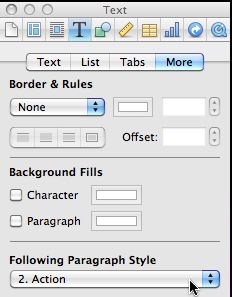
If any of these behaviors annoys you, you can change them.

Simply place your cursor in any block of any type, and click on the blue “Inspector” button in the top of the document window (or navigate to View->Show Inspector.)

In the inspector, click on the big “T” button (for text.)

Next, click on the text inspector’s “More” tab, and midway down the window you’ll see a drop-down labeled “Following Paragraph Style.”

Change that to whatever type of block you’d like to automatically follow the current kind of block.

The template itself has these same full instructions built in. To use it, just download it and put it in your My Templates folder, or if that’s too much trouble, you can just double-click the downloaded file and a new, untitled document will open up in Pages ’09, ready to go.

Useful?

If you like this template, please tell your friends to visit our blog and to follow us on Twitter:
@JokeAndBiagio
Thanks and enjoy!

Download the JNB-Screenplay-Page-Template here.

Ready to Break into Hollywood?

  • • Learn to turn your ideas into films and TV shows
  • • Discover secrets to get noticed by Hollywood
  • • Pitch us your reality TV and documentary series ideas.
  • • Seriously.

          Sign up and we might work together soon. 

  • heather

    i cant download it, puts it into a file and cant find it in file!

    • http://www.jokeandbiagio.com Biagio

      What kind of file does it download? Try right-clicking and saving it to your Mac’s desktop, then just double click that file to launch Pages. Hope this helps.

  • Lisa

    Thank you thank you thank you… That’s all I can say! Works like a charm.

    • http://www.jokeandbiagio.com Biagio

      Lisa, so glad it’s working for you! Enjoy.

  • Olembe

    I’ve downloaded it but when I unzip it I’m left with a folder and can’t get it to open any kind of document with pages. There is no pages file or pages template file in the folder. What am I doing wrong?

    • http://www.jokeandbiagio.com Biagio

      Sorry, Olembe, when you unzip it you should get:
      JNB-Pages-Screenplay.template

      What exactly are you getting?

  • Sal Gill

    Wow! This works wonderful!!! Thank you so much for this service. This is the best thing to have in case you don’t have FinalDraft or MovieMagic. Everything else out there, in my humble opinion, is not any good. I also like the fact that, by using Pages, you can export as a pdf. Thanks again!!!

    • http://www.jokeandbiagio.com Biagio

      Glad it’s working out for you. Thanks for the nice comment.

  • GN

    Cannot download. Box that states safari cannot DL. New to Ipad (as well as to screenwriting and your site) so perhaps simple solution. Hope to hear soon. Thank you.

    • http://www.jokeandbiagio.com Biagio

      GN…just tested it in Safari on a mac and it’s downloading okay. Are you taking it straight to your iPad?

  • http://www.nada.art.br bagadefente

    Hi!

    I’m getting the same problem an Olembe.
    when I unzip I get a folder with this archives:
    “buildVersionHistory.plist”, “index.xml” plus the folders “Contents”, ‘QuickLook” and “thumbs”.
    any ideas?

    P.S.: i’m on os X 10.6.6

    • matt

      Hey, I had the same problem, but I found a way to fix it. Right click the folder and select “Get info”. Then, where it says “name and extension” just add the extension “.template” to the end of the name. It will bring up a warning and just click ok. Then it will turn from a folder into a .template file. Hope that helps.

      • http://www.jokeandbiagio.com Biagio

        Hey Matt,
        Thanks for chiming in with that. Been knee deep producing Commercial Kings, so really appreciate you taking the time to figure it out.

        • Witkneemott

          I tried all of the suggestions but I can not get this template to work. Could it be because I have the newest version of Pages?

      • http://www.nada.art.br bagadefente

        Hey, this really worked…
        Thank you Matt!
        And of course thank you Biagio!!
        Now I just have to write…!

      • Olembe

        Yep that solved the problem thank you very much!

  • Ana

    Celtx does the job very well, but your template just saved my life! Thanks a lot

  • fredthe3rd

    This is a brilliant template! You should be proud. And free! So generous. I’ve used it to write three short films so far.

    Sometimes though the box down the side titled ‘Paragraph Styles’ disappears from  a document and I don’t know how to get it back? 

  • Eric McCoy

    Very nice work, guys. Thank you for doing this!

  • Jurgen

    This is really nice of you – thanks a lot! The advantage over the google docs screenwriter template is obviously that one doesn’t need to be online. I’m not sure about the Celtx, I receive so many advertisements from them that I feel… strange.
    Thanks again!